Note
I wanted a gym log, not another thing to manage at the gym.
Building Gym log with Hermes and Cursor: a simpler phone logger, the bugs real workouts exposed, and a Pebble app that lets me put the phone away.
I wanted to walk into the gym, see what I’d lifted last time, remember which setting the machine was on, and record what I actually did.
Not particularly complicated. Or at least it shouldn’t have been.
The first version we built prompted this fairly useful bit of product feedback from me:
“Seems massively overdesigned????”
Followed by:
“Way too complex, it should just be like a todo list, with additional info surfaced when asked.”
That ended up being the brief for Gym log. A small self-hosted workout logger, first on my phone and then on my Pebble Time 2. Most of the interesting work happened after the first screen existed.
It started as a note with checkboxes
Before the app, my workout plan lived in Obsidian. I could tick off exercises, change the weights, and have Hermes process the session into history.
That was a reasonable place to start. A note was easy to reshape, and I didn’t need a whole application just to write down some numbers.
But the surrounding machinery was starting to matter too much: syncing the vault, opening the right note, processing the ticks, clearing the boxes for next time. The chats contain me asking why the plan hadn’t been reset, and reminders opening the wrong thing.
Eventually I explicitly told Hermes that the new app was the system now. The old notes and CSV could stay as history, not continue as competing places to log the same workout.
Gym log became its own app: FastAPI, SQLite, plain JavaScript and a phone-installable PWA, running in Docker on my home server. No large front-end framework needed for a list of exercises and some numbers.
A list, not a spreadsheet pretending to be helpful
The early design was organised around prescribed weekdays and a grid of set inputs. I pushed back on both.
My schedule changes. Sometimes I mix things up. The app shouldn’t need an argument about which day it is before it lets me record a workout.
So the interface became Upper and Legs tabs, with exercises I could check off as I did them. The working weight belongs in the main row, not hidden behind another tap. Machine settings matter too: remembering the seat position is part of making the next visit easier.
Details open when I need to change something. Previous completed values provide the starting point. I generally use the same load across three sets, but the repetitions can differ, so those need to be recorded separately.
One small distinction turned out to be important: Save is not Done. Saving edited numbers closes the detail row; checking the exercise off is a separate action. A cleaner interface shouldn’t quietly change the meaning of the log.
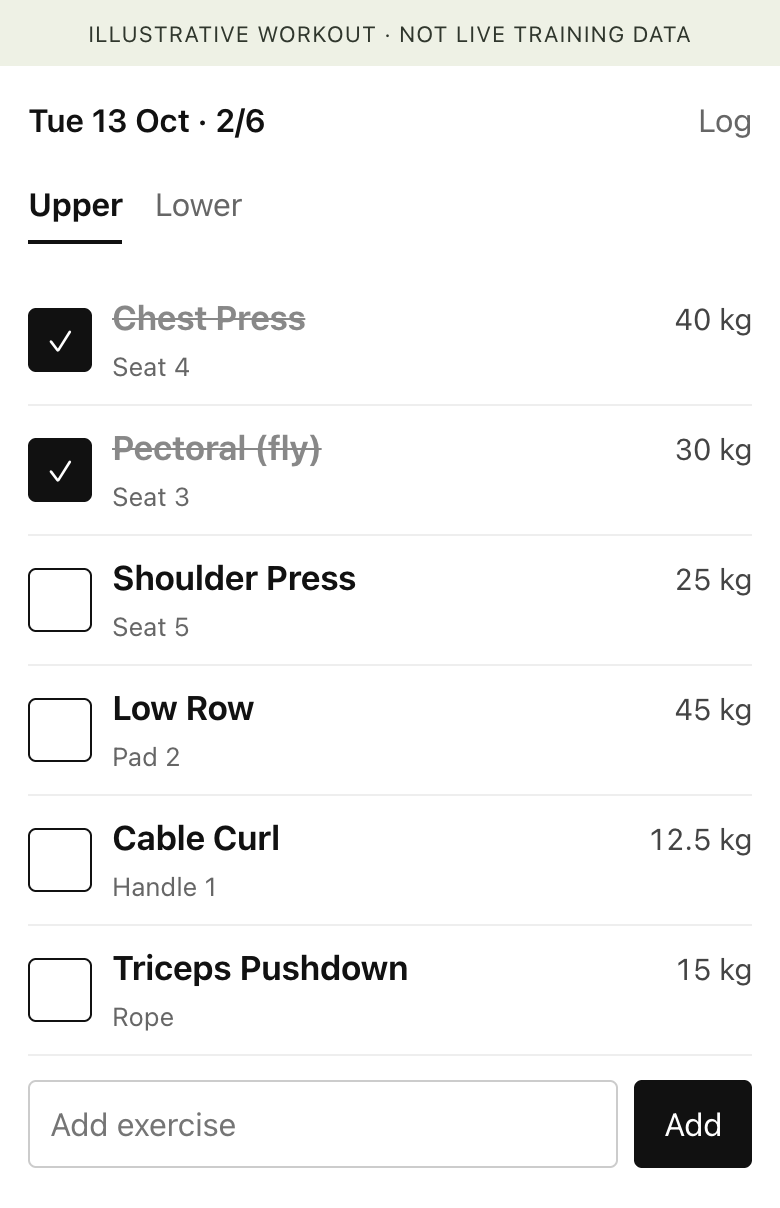
The actual phone app, running against a separate demonstration database. Workout values are illustrative.
Then I used it in an actual gym
Something that works on a laptop on a good connection isn’t necessarily ready for a phone between sets.
We added cached reads, bounded retries and an offline write queue. Then I reported this from the gym:
“Sometimes my progress in the frontend app gets overwritten by something, quite annoying!”
Quite annoying was putting it politely. I’d just entered the numbers. The app’s entire job was to keep them.
It wasn’t one mysterious database problem. Several bits of helpful behaviour were fighting each other.
Mutation responses contained the whole day’s session. An older request could finish after a newer one and replace the screen with older data. The check-off button also sent a whole-row snapshot, potentially putting stale weights back. Meanwhile, queued offline edits could replay after newer connected edits.
We fixed the write ordering per exercise, protected pending edits from incoming refreshes, and made checking off send the completion flag rather than rewriting all the numbers. The ordering information had to survive a page reload too; counters that reset when the app reopens aren’t much use against an offline queue that doesn’t.
We also added an audit trail for committed writes. If a number changed again, we wanted the actual request sequence, not another round of guessing.
And then there was the less satisfying discovery that a tested fix could still fail to reach my phone because its JavaScript URL hadn’t changed. Old cached code and a new helper file weren’t a working release just because the container had rebuilt.
A separate service-worker trap involved the authentication layer: an expired sign-in could redirect an asset request to a login page, which returned HTTP 200. Caching that as JavaScript is not an excellent way to build an app.
The result needed to distinguish saved data, a bad connection and an expired sign-in. They might all stop a fetch, but they don’t mean the same thing to the person holding the phone.
The obvious next question: why am I still on my phone?
Once the phone logger was useful, I asked Cursor:
“Think about how we can extend this app to include a simple Pebble app, so I don’t have to be on my phone while at the gym.”
The watch needed real checkboxes, readable rows, and a way to change weight and reps. I wanted it to feel related to the shopping-list app we’d already built, not like an unrelated miniature dashboard.
Crucially, the phone and watch needed to use the same session.
The wrist app uses Pebble’s C SDK. PebbleKit JS on the phone acts as the HTTP bridge, transferring compact exercise records over Bluetooth. The watch itself doesn’t connect directly to the internet. Loads are encoded in half-kilogram units, and changes are sent back through the app’s API.
The server remains the authority. A watch tick is confirmed when the server accepts it; the wrist client doesn’t have a separate offline write queue pretending that a failed request succeeded. Polling carries changes between the phone and watch, with special handling while an exercise is being edited.
That made the Pebble a different interface to the same log, rather than another thing I had to synchronise later.
Even the rest timer needed to belong to the workout
My separate Pebble timer kept closing Gym log whenever it went off. Pebble runs one watch app at a time, so launching the timer wasn’t a harmless notification over the top of the workout.
The wrist version grew its own rest timer instead.
The follow-up feedback was very gym-specific: don’t start a rest merely because I’ve backed out of a detail screen; keep the machine setting visible; don’t make the timer gesture change depending on which screen I’m looking at.
We settled on a consistent rest action and a footer that kept the machine setting and countdown in predictable places. Those details sound small until you’re trying to operate the thing between sets.
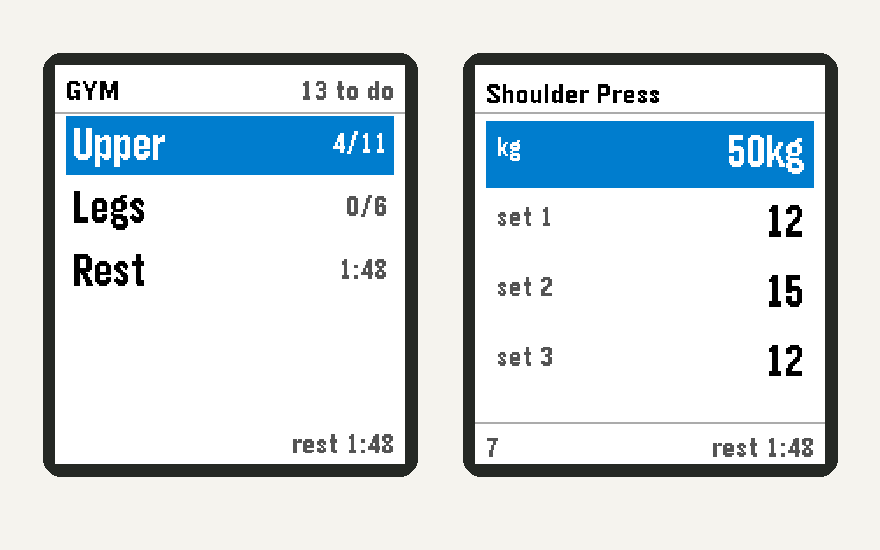
Earlier development captures from the Pebble emulator: split picker, rest countdown and weight/reps editor. Labels and layout reflect that stage of the build.
We explored putting the timer in the phone app too, but that web version was subsequently reverted. I’m not going to count an experiment as a shipped feature just because there’s a build conversation about it.
Coaching without inventing a workout
The logger also grew some progression hints, but I wanted those to respect the equipment and the actual records.
The app’s policy waits for three completed same-load sessions with all sets reaching the top of the rep range before suggesting an increase. It uses the machine’s configured increment and maximum. A suggestion for a weight the stack can’t select is not useful coaching.
At a load cap, the phone can suggest a rep target instead. It stays quiet during the normal climb back through the rep range after a weight increase, rather than treating every set below twelve as failure.
Those are explicit app rules, not measurements of effort or form. Imported history had default repetitions filled in, so it couldn’t honestly be used as evidence that I’d achieved those reps.
The boundary matters more than the hint: a suggestion is not something I lifted. A routine edit is not a completed session either. The later routine-only endpoints let my health coach add an exercise without opening a workout or writing performed weights and reps.
The progression hints are on the phone. Bringing them onto the wrist is a separate piece of work; the current watch protocol doesn’t carry them just because the backend can calculate them.
One log, including when an agent reads it
There was another surprisingly important fix: Hermes initially read a local SQLite copy while I was logging into the server’s database. The agent could be perfectly confident about a history that had stopped updating.
The MCP connection now reads the live app over HTTP, through dedicated read routes. Asking what I lifted shouldn’t create today’s session as a side effect, and changing a routine should use the app’s own supported route rather than a database backdoor.
Home Assistant fits around this: noticing gym arrival and offering a shortcut to the phone app. Attendance belongs to the health system; weights and reps belong to Gym log. Being at the gym doesn’t prove which exercises I did.
That’s what I like about where this ended up. The visible part is still a fairly ordinary list. Underneath, it has to be careful about what was saved, what was completed, what was suggested and which copy of the data anyone is looking at.
I wanted less admin in the gym. Getting there involved quite a lot of admin outside it. But at least now I can put the phone away and tick an exercise off on my wrist.